For hotels and hospitality
Inspire the trip, answer the question, thank every guest
Schedule the season's Reels, Pins and offers months ahead, let an away message answer the booking questions that arrive overnight from other time zones, and reply to Google and Facebook reviews from one inbox.
- Google Business
- YouTube
- ₹2,495 / $30 a month for this setup
A guest's journey, from first scroll to review
Plan seasons, not weeks
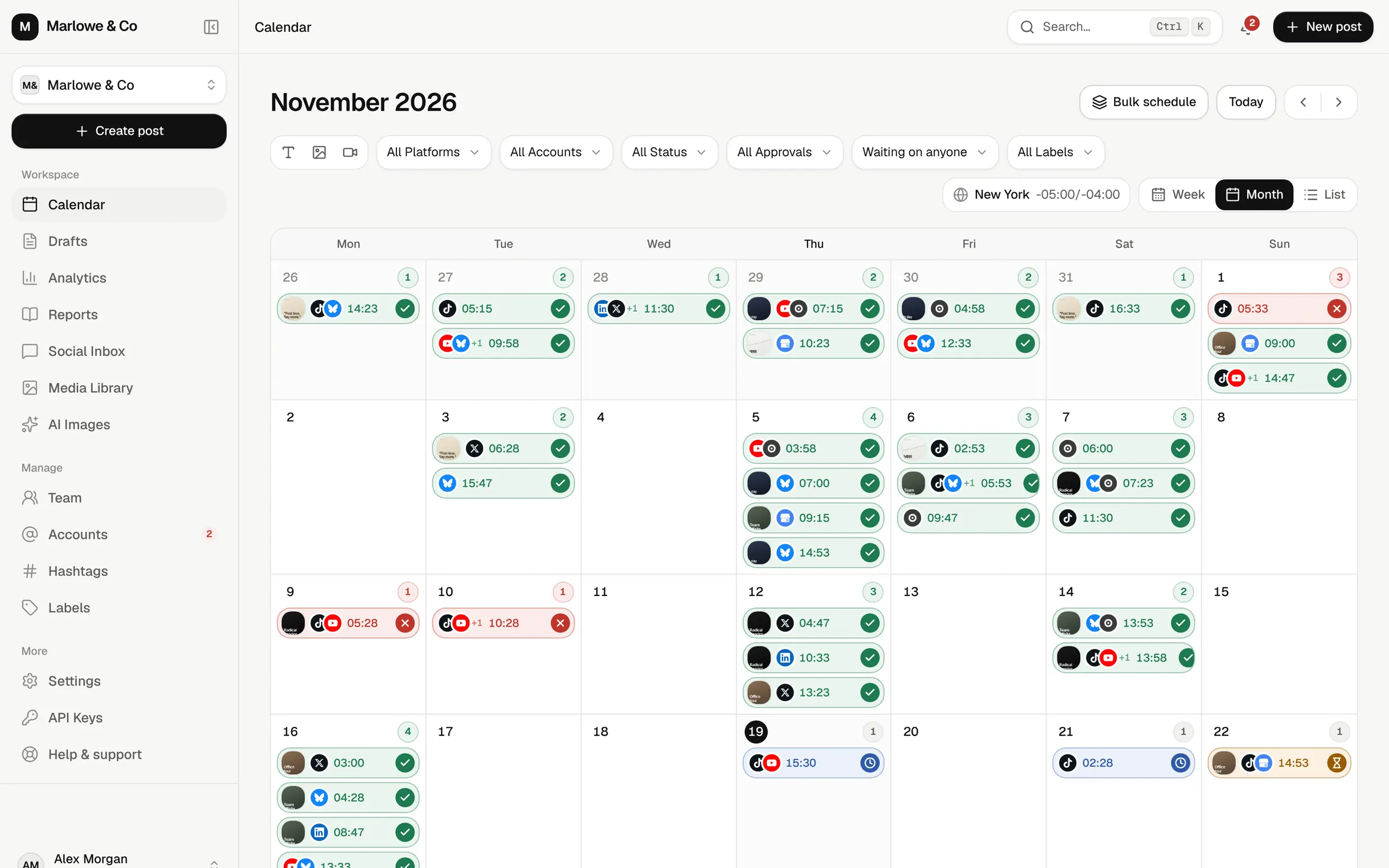
Schedule a winter campaign's Reels, carousels and Pins in October, label it, and see the whole season on the month view.
Content CalendarAnswer booking questions while you sleep
Guests write from other time zones at 2am. The away message replies outside your opening hours, and keyword replies cover 'parking', 'pets' or 'breakfast' on Instagram and Facebook.
Social InboxThank every reviewer
Google reviews and Facebook recommendations land in one list, complaints tagged negative. Assign those to the general manager and personalise a saved reply for the rest.
Social InboxBe there when people plan trips
Pinterest works like a search engine, so Pins of rooms, views and nearby walks with a clear title and a link to your booking page keep being found.
Content CalendarSell packages and events on Google
Weekend packages as offers with an end date and redeem link, and a Sunday jazz brunch as an event, on the profile guests see on Maps.
Content CalendarCompare this season with last year's
Analytics compare with the same period last year, so summer is judged against last summer, not against spring.
Analytics
How it works for hotels and hospitality businesses
Each step is a part of HeyOrbit you can open and read about.
Connect the property's channels
Instagram, Pinterest, YouTube, Facebook and each Google Business location.
Content Calendar Guide: Connect social accountsSet opening hours and the away message
The inbox uses the workspace timezone, so out of hours means the hotel's hours.
Social Inbox Guide: Inbox automations and alertsSchedule the season
Bulk-schedule the shoot a batch at a time, up to 20 posts each, with a label per campaign.
Bulk Scheduling Guide: Bulk schedulingLet the GM approve rates and offers
Anything with a price waits for the general manager before it publishes.
Approval Workflows Guide: Approval workflow
The platforms that matter for hotels and hospitality businesses
The formats ticked are the ones you'll use most. Every format listed publishes automatically.
Instagram
- Feed post
- Carousel (used most)
- Reel (used most)
- Story (used most)
Rooms, views and the breakfast spread as Reels and carousels; Stories for today's weather on the terrace.
Instagram schedulingPinterest
- Pin (used most)
Destination boards with links back to your booking page; Pin clicks and outbound clicks show in analytics.
Pinterest schedulingGoogle Business Profile
- What's new (used most)
- Offer (used most)
- Event (used most)
Packages as offers, events with dates, and every Google review in the inbox; analytics show calls and direction requests.
Google Business schedulingYouTube
- Video (used most)
- Short (used most)
Room tours and Shorts with titles, tags and a playlist per season.
YouTube scheduling
A week in HeyOrbit
An example week, from the first draft to the last reply.
Monday09:00
Season planning
The month view shows the winter campaign from November to March; two gaps in January filled from the media library.
Tuesday02:14
A question from another timezone
A guest asks about dog-friendly rooms. The away message replies and the conversation waits for reception.
Wednesday11:00
Package approved
The GM approves the ski-week package from the email; it posts to Google as an offer with an end date.
Thursday16:00
Review replies
Reception answers four Google reviews and assigns a complaint about parking to the GM.
Friday08:00
Weekend inspiration
A sunrise Reel publishes on Instagram and a room tour Short on YouTube.
Sunday18:00
Year-on-year check
This month against the same month last year, with the top posts of each.
What this setup costs
One hotel on Instagram, Facebook, Pinterest, YouTube and Google Business
- Instagram profile1 × ₹499 / $6
- Facebook Page1 × ₹499 / $6
- Pinterest account1 × ₹499 / $6
- YouTube channel1 × ₹499 / $6
- Google Business location1 × ₹499 / $6
Instagram profile + Facebook Page + Pinterest account + YouTube channel + Google Business location = 5 accounts = ₹2,495 / $30 a month
A group with several properties adds each property's accounts; reception and every manager log in free.
5 accounts × ₹499 / $6
₹2,495 / $30
a month, everything included
AI Studio is optional: ₹799 / $9 a month.
- Unlimited team members & reviewers
- Full white label
- Advanced analytics
- Branded reports
- Multi-step approvals
- Social inbox
Free to sign up, no card. Billed monthly per connected account; taxes are added where they apply.
Hotels & hospitality: common questions
Can HeyOrbit answer booking questions at night?
Can we reply to Google reviews and Facebook recommendations?
Can we schedule months ahead?
We have several properties. How does that work?
Can we post for guests in other countries?
What does HeyOrbit cost for a hotel?
The features behind this page
Platforms
Comparing tools
Also worth a look
- Restaurants & cafésDaily specials before lunch, Google Business offers and events, reviews answered between services.
- Multi-location brandsEvery location's Google and Facebook at once, local managers kept to their own accounts.
- Gyms & fitness studiosThe timetable on repeat, challenge series in one batch, coach clips as short video.
- Book a callTalk your setup through with the HeyOrbit team.
All solutions by team and by industry.
Every season, planned ahead.
Seasonal campaigns, overnight replies and every guest review answered from one place. Start free, pay per connected account.
Prefer to talk first? Book a call with our team
- Unlimited team members
- 10 platforms
- Start free, pay per account